
15 min read · 2026-09-18
LegoFlow: Easy and Interactive Code Data Engineering
TL;DR
Coding is the core capability of modern LLMs, yet producing high-quality coding data remains surprisingly complex, involving a long pipeline of repository discovery, task verification, trajectory rollout, training, and evaluation. Today we introduce LegoFlow, an easy and interactive framework for code-data engineering. Highlights include:
- Agent-native workflows: LegoFlow packages every procedure, from repository and PR collection through task verification, trajectory rollout, training, and evaluation, as a standard plugin skill that coding agents such as Claude Code or Codex can invoke directly.
- Open-source tasks and trajectories: We release LegoFlow-SWE, containing 5,000 tasks carefully filtered from 12M PRs and covering 8 programming languages and 20 task tags. We also release 2,780 successful trajectories. Training Qwen3.5-35B-A3B-Base on only 1K samples reaches 48.8% on SWE-bench Pro.
- Toward recursive self-improvement: With minimal human intervention, LegoFlow can run the complete pipeline, evaluate results, and adjust its strategies. Across two iterations, it improves Qwen3.5-35B-A3B-Base from 7.6% to 64.4% on SWE-bench Verified.
How LegoFlow works
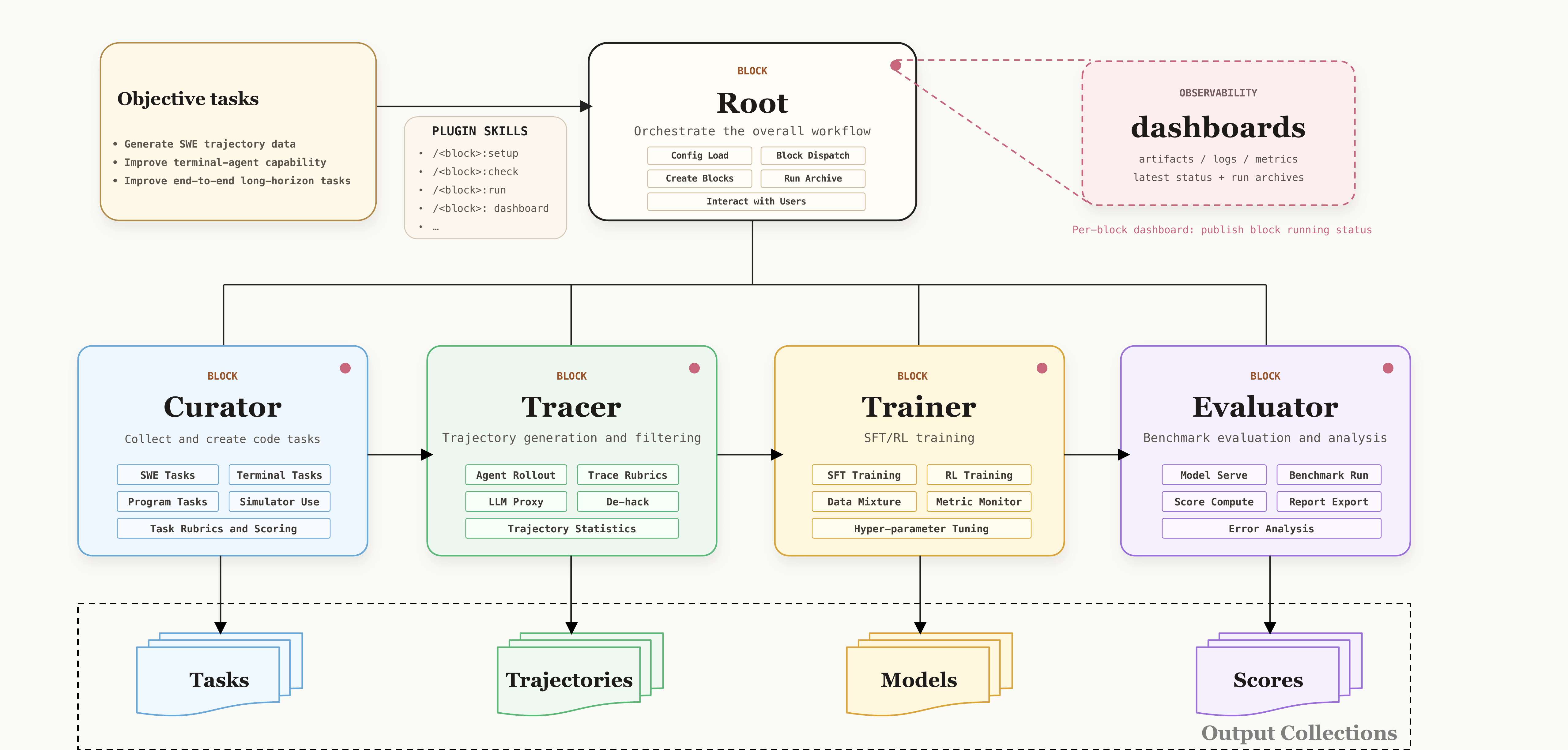
LegoFlow organizes code-data engineering as a chain of blocks. The Root block translates a user objective into a workflow and coordinates task dispatch, resources, and feedback. Curator turns repositories and pull requests into verified tasks, Tracer produces training trajectories, Trainer fine-tunes the model, and Evaluator returns benchmark results for the next iteration. Because every block is packaged as a plugin skill, a coding agent can operate the workflow while each stage remains inspectable and reusable.
The block design philosophy
Complex engineering workflows are typically divided among multiple engineers, each responsible for a well-defined part of the process and coordinating with others. LegoFlow brings the same structure to agentic workflows. Each block acts like an engineer: it is managed by a coding agent and comes with the repositories, scripts, dependencies, and environments required for its role. Each block is also packaged as a plugin skill, allowing users to invoke it directly through an agent. See What is a Block for details.
Curator: Building verified coding-agent tasks
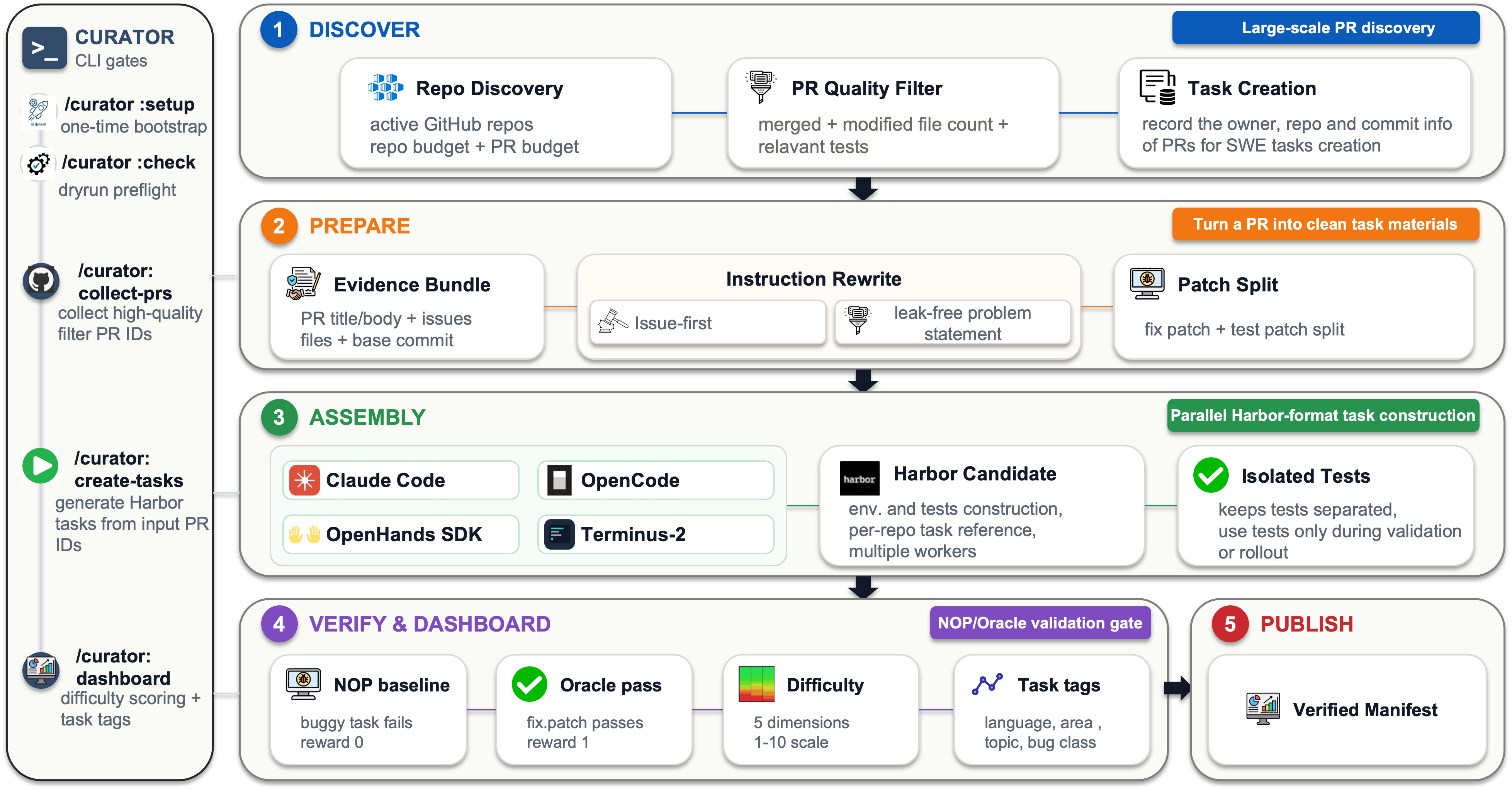
Curator creates verified coding-agent tasks by collecting GitHub repositories and pull requests. As shown in Figure 2, the primary steps include:
- Step 1: Discover. Search active repositories for relevant merged pull requests, apply basic quality filters, and record the source information needed to create candidate tasks.
- Step 2: Prepare. Gather the pull request, issue, commit, and test evidence; rewrite it as a clear, leak-free task; and separate the fix from the tests.
- Step 3: Assembly. Build each candidate in the standard Harbor task format, with an isolated environment and tests that can be used for validation and rollout.
- Step 4: Verify & Dashboard. Confirm that the buggy version fails and the reference fix passes. Each verified task is then assigned a difficulty score, tagged for analysis, and added to the published manifest and dashboard.
Tracer: Generating and selecting agent trajectories
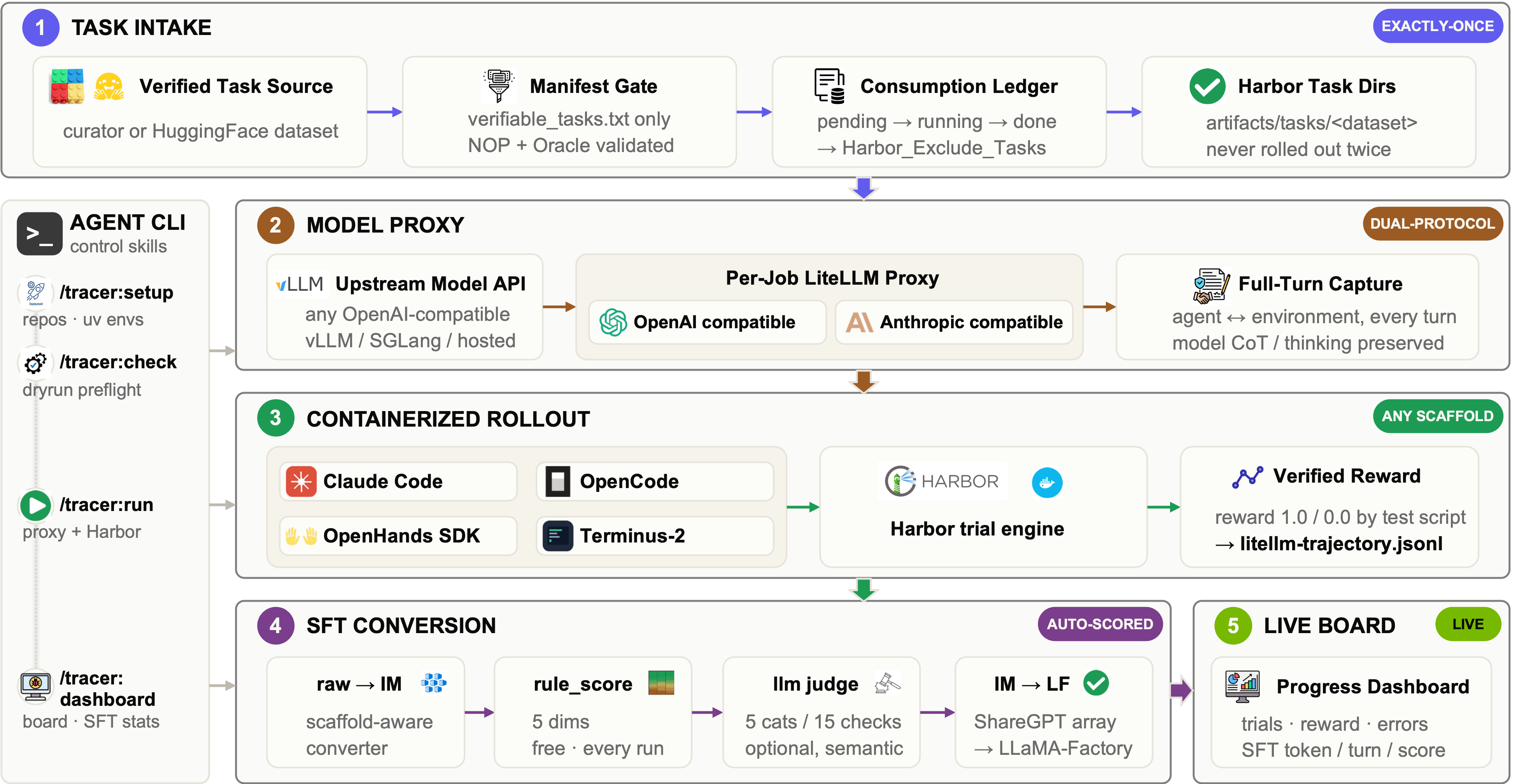
Tracer generates trajectories from verified tasks using Claude Code, OpenCode, OpenHands, and other coding-agent scaffolds. Figure 3 shows how Tracer turns verified tasks into reusable training data. The primary steps include:
- Step 1: Task Intake. Load verified tasks from Curator (or from an external dataset), validate the task manifest, and prevent duplicate rollouts.
- Step 2: Model Proxy. Connect coding-agent scaffolds to the selected model through a shared proxy while recording complete model interactions.
- Step 3: Containerized Rollout. Run each agent in an isolated Harbor environment, execute the verifier, and record the resulting reward and trajectory.
- Step 4: SFT Conversion. Convert valid trajectories into a consistent training format, apply rule-based and model-based quality scoring, and prepare the selected samples for training.
Trainer and Evaluator
LegoFlow verifies data quality through SFT training and evaluation, handled by Trainer and Evaluator, respectively. The agent can automatically convert valid trajectories from Tracer into the standard LLaMA-Factory format for Trainer. After SFT training, Evaluator automatically locates the model checkpoint, runs benchmark evaluations, and publishes reports to the dashboard for the next iteration.
Built on Harbor, the Evaluator supports agentic benchmarks such as SWE-bench Pro through the standard Harbor task format. We also mitigate evaluation hacking through measures such as network restrictions and anti-hacking prompts, keeping the results focused on the model's capabilities.
In addition to SFT, we are actively integrating our recent project Lego-RL into Trainer so that it can use verified Curator tasks directly for RL training.
Dashboard visualization
Code-data pipelines can run for hours or days, so every LegoFlow block includes a dashboard for monitoring progress and inspecting intermediate outputs. Figure 4 shows a Curator snapshot covering 822 repositories, 8,818 pull requests, 926 constructed tasks, and 270 verified tasks.
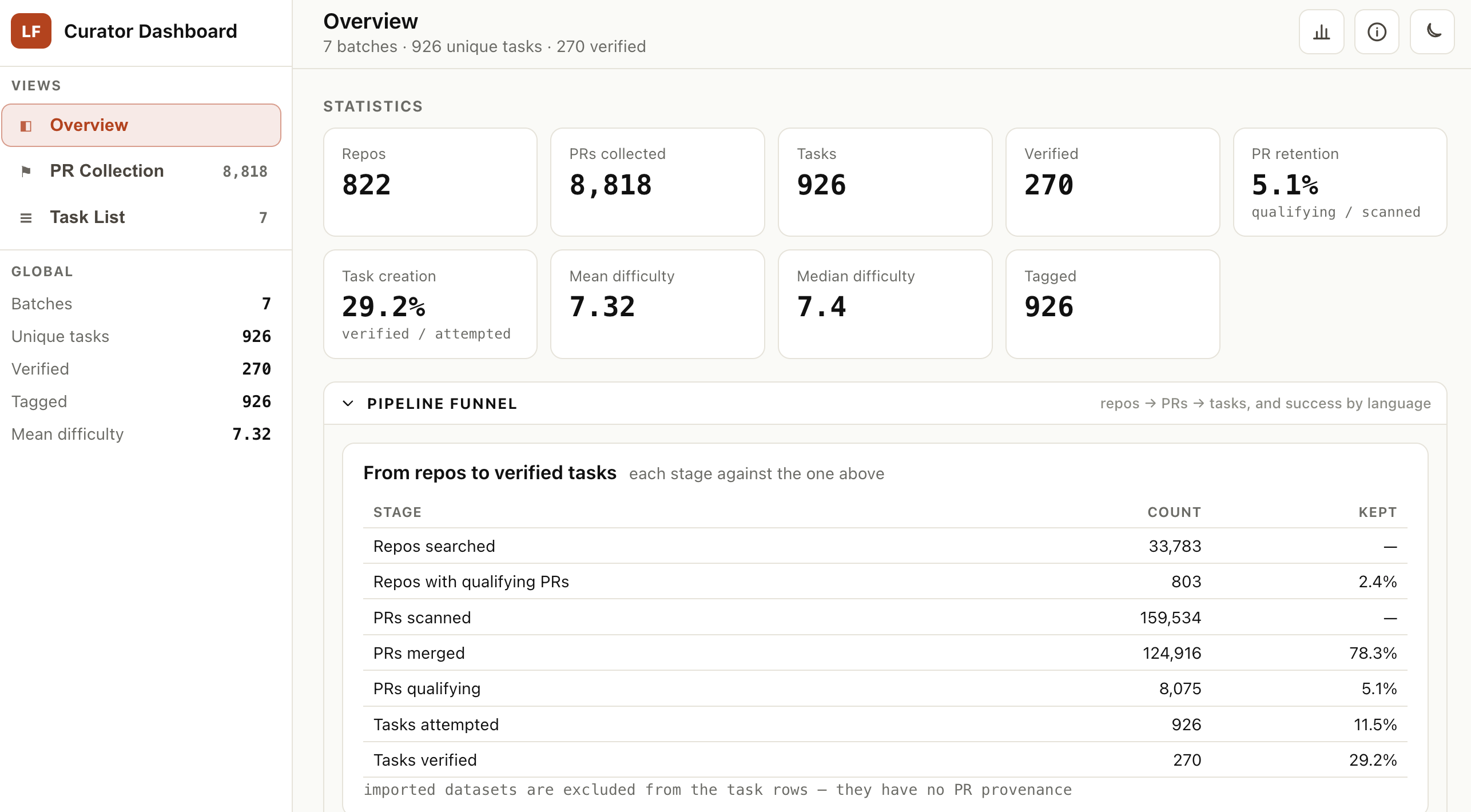
The dashboards also expose pass rates, tag distributions, rubric scores, sampled trajectories, and evaluation details. Several examples are available:
LegoFlow-SWE: Building Verified Tasks at Scale
GitHub contains millions of pull requests, but only a small fraction can become reliable software-engineering tasks with reproducible environments and tests. To test whether LegoFlow can build such tasks at scale, we release LegoFlow-SWE, an open collection of SWE tasks and trajectories curated from 12M candidate pull requests. We then evaluate whether this data can compete with existing state-of-the-art SWE datasets (e.g., ScaleSWE and DeNovoSWE) under fair settings.
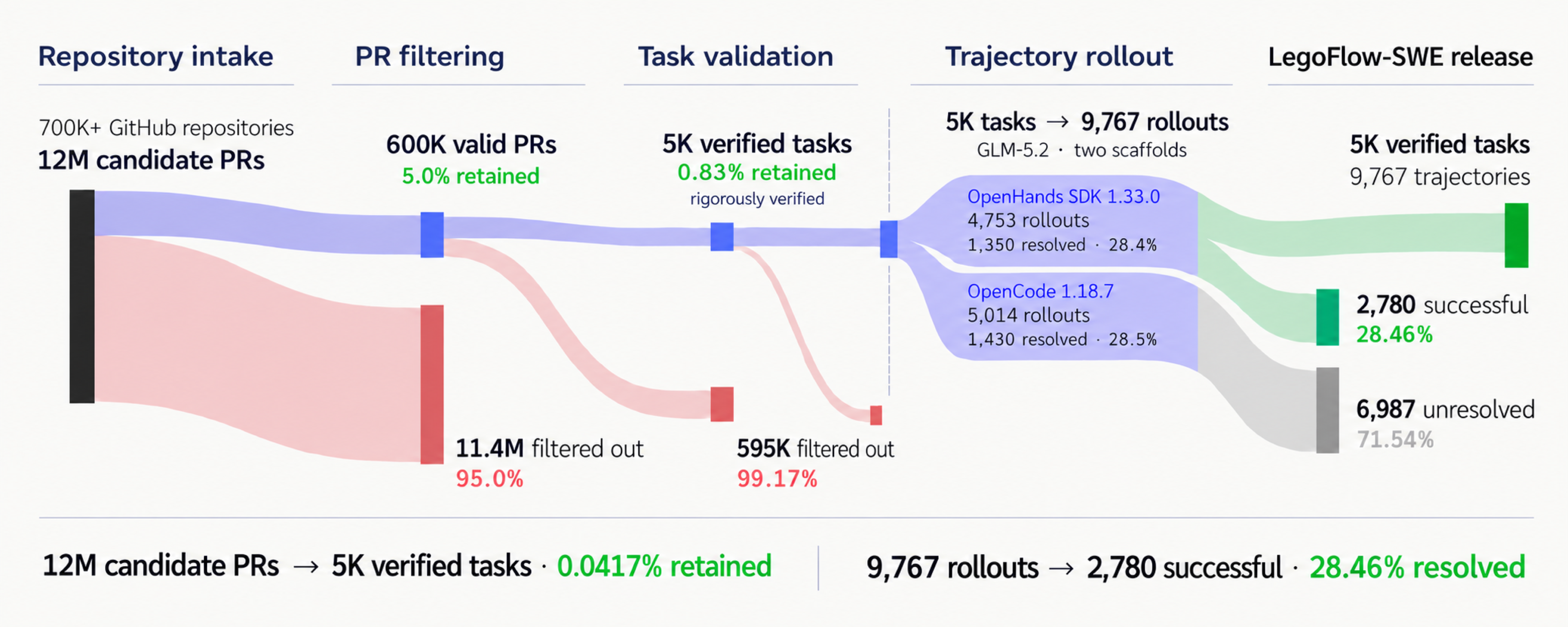
LegoFlow-SWE begins the construction process from collecting more than 700K GitHub repositories with 12M associated candidate pull requests. Despite the large amount of PRs, the filtering criteria for valid diffs, reasonable patch sizes, tests, and issue evidence reduce this amount to merely 600K PRs. Furthermore, a LLM judger and execution validation then remove trivial or unverifiable tasks, leaving 5,000 verified tasks, or 0.0417% of the original pool. GLM-5.2 generates 9,767 rollouts across OpenHands SDK and OpenCode, of which 2,780 pass verification.
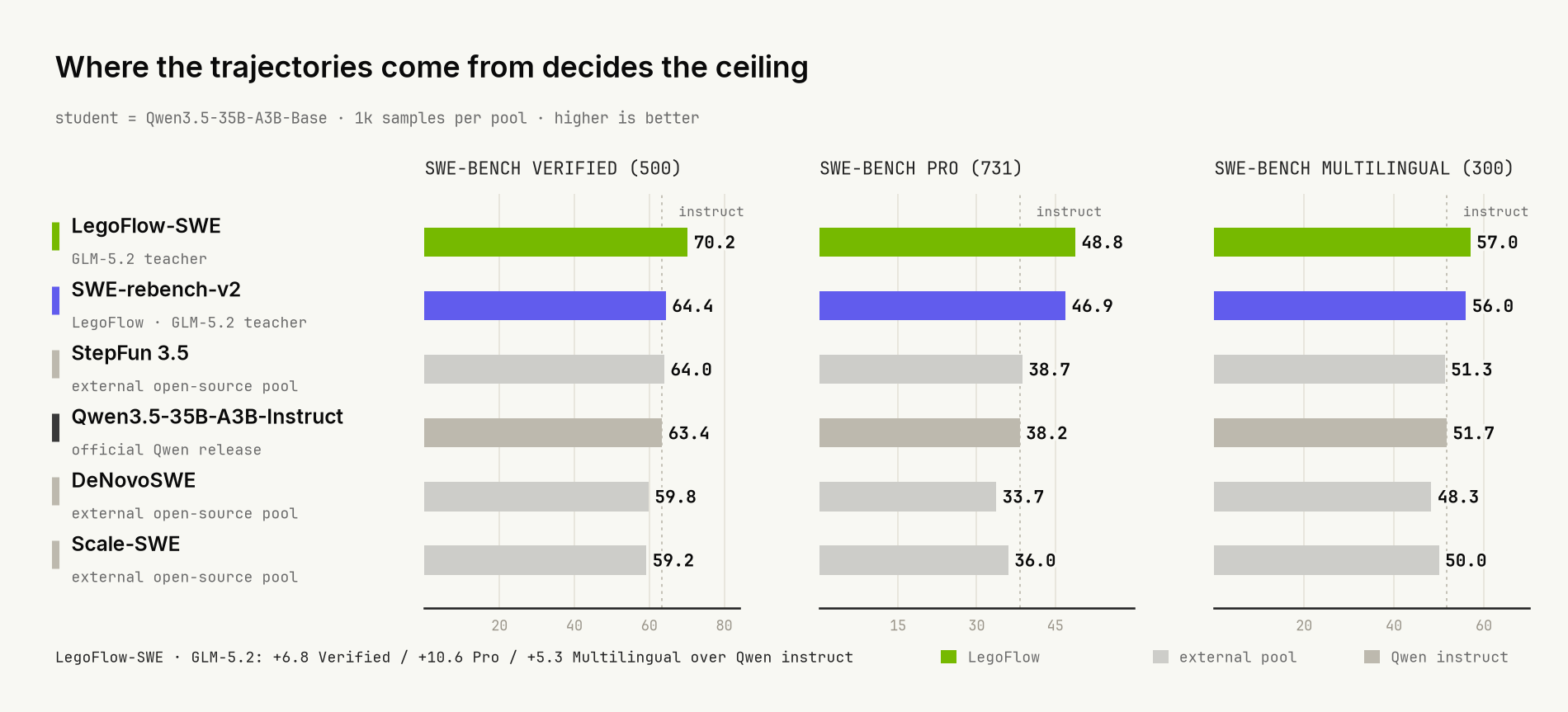
Results. To test whether the resulting task source improves training, we keep the teacher, scaffold, scoring, sampling, and budget fixed. We fine-tune Qwen3.5-35B-A3B-Base on approximately 1,000 trajectories from each source and evaluate every model with OpenHands SDK 1.33.0 on SWE-bench Verified, Pro, and Multilingual. Training on LegoFlow-SWE reaches 70.2% on SWE-bench Verified, 48.8% on SWE-bench Pro, and 57.0% on SWE-bench Multilingual. It performs above both the Qwen instruct reference and the strongest external open-source trajectory pool tested. Compared with SWE-rebench-v2 under the same setup, LegoFlow improves the three benchmarks by 5.8, 1.9, and 1.0 points, respectively.
During the process of constructing LegoFlow-SWE, we also discover quite a few important findings and record them in a separate post:
Towards Recursive Self-Improvement
LegoFlow-SWE validates a single pass through the pipeline. We next ask whether the evaluation feedback can be leveraged to improve the next iteration of data collection and model training. In this version, we run an end-to-end experiment covering repository and PR collection, trajectory generation, training, evaluation, and iterative strategy refinement, all managed by an agent with minimal human intervention.
Objective. Starting from GitHub repositories rather than an existing task or trajectory pool, use curator, tracer, trainer, and evaluator to build training data and fine-tune Qwen3.5-35B-A3B-Base. The target is a resolve rate above 60.0% on SWE-bench Verified using 512 valid trajectories.
Before the first iteration, the base model achieves a 7.6% resolve rate on SWE-bench Verified.
Iteration 1: The initial attempt. The Root block receives the objective and coordinates the workflow. Curator builds 4,166 verifiable SWE tasks from merged pull requests in real GitHub repositories. Tracer then produces 915 valid GLM-5.2 trajectories, and the pipeline selects the top 500 by rubric score. The trained model reaches 56.1% on SWE-bench Verified, below the 60% target.
Iteration 2: Refining the trajectory filter. The first evaluation points to two data problems. Although 80.7% of the responses contain <think> blocks, many contain only short phrases such as "let me check" or "now I'll try," without substantive debugging. Some trajectories also use a tool-call format that the evaluation scaffold cannot parse. The agent responds by filtering for reasoning density and adding a normalization step for tool calls before training again.
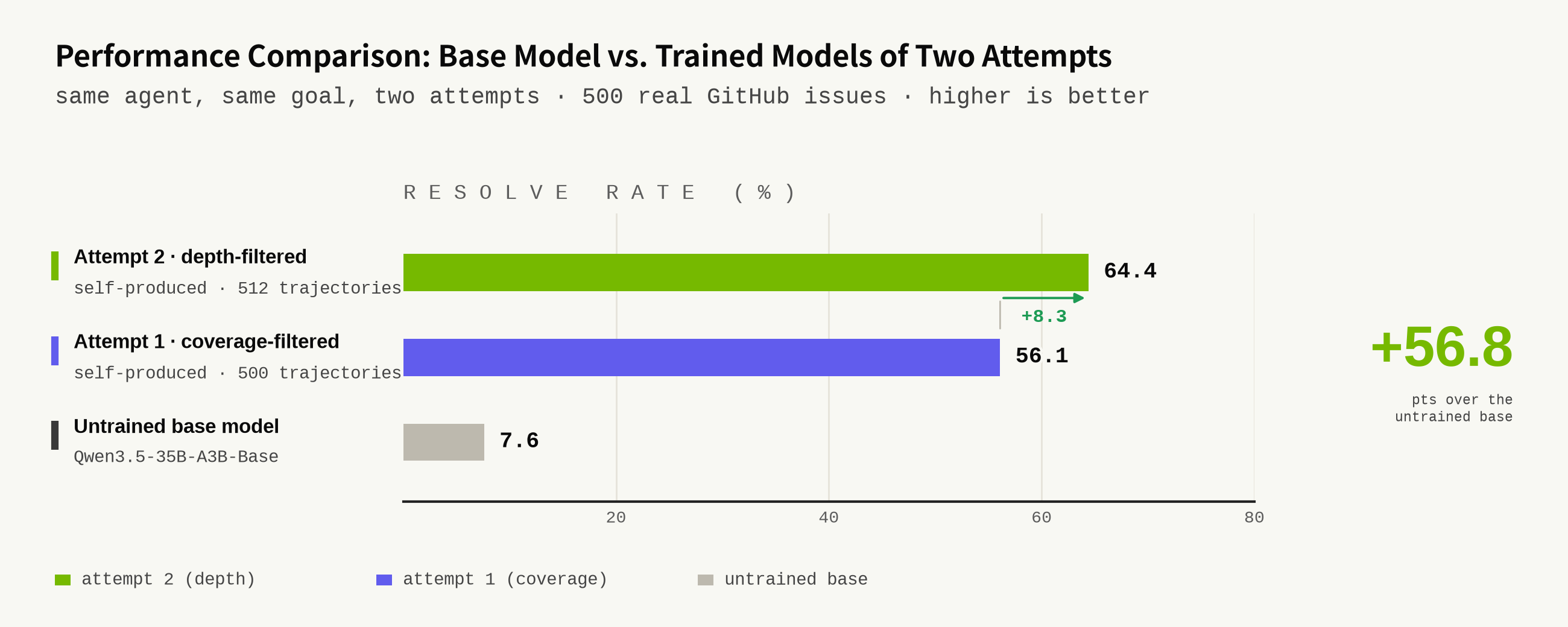
Results. From the 915 trajectories in the first iteration, the agent drops 97 duplicates and 234 overly shallow trajectories. Median reasoning length increases from 140 to 959 characters per turn, while the ratio of reasoning contents falls from 80.7% to 30.7%. After training on the 512 trajectories retained after filtering, the model reaches a 64.4% resolve rate, exceeding the original target. To reproduce the workflow, see Running the Full Pipeline.
What’s next?
These experiments connect two uses of LegoFlow: producing verified code data at scale and using execution feedback to improve how that data is selected.
🔥 We are extending the same block-based workflow in three directions:
- TerminalBench: We are migrating and upgrading our Terminal-Lego work within LegoFlow to incorporate new changes introduced in Terminal-Bench 3.0 and Terminal-Bench 4.0.
- ProgramBench and NL2Repo: We are mining more complex, long-horizon software-engineering tasks that begin with either an executable program or a natural-language requirement.
- Recursive self-improvement: Having demonstrated an end-to-end LegoFlow run, we believe block execution feedback can support more general, long-running self-improving systems.
Citation
@misc{legox2026legoflow,
  title        = {LegoFlow: Easy and Interactive Code Data Engineering},
  author       = {{LegoX Team}},
  year         = {2026},
  url          = {https://legox.net/blog/legoflow/},
}